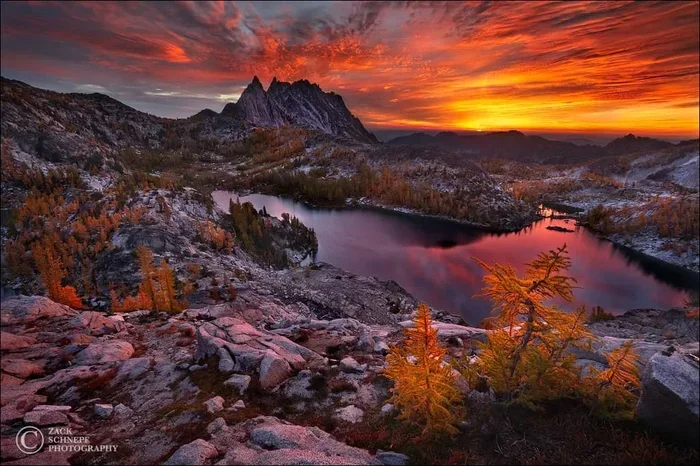

The HDR meaning is High Dynamic Range, a technology that expands the range of brightness and color your screen can display. HDR makes images look more realistic by preserving details in both the brightest highlights and the darkest shadows. Whether you are shooting photos, watching movies, or buying a new TV, understanding HDR helps you get the most out of your devices and content.
You have probably seen the term HDR meaning pop up everywhere lately. It is on TV commercials, phone specs, and camera menus. But what does it actually mean? And more importantly, why should you care?
High Dynamic Range is one of the biggest upgrades in display technology in the last decade. It changes how images look on your screen by making bright areas brighter and dark areas darker. The result is a picture that looks closer to what your eyes actually see in real life.
In this guide, we will break down the HDR meaning in plain language. You will learn how it works, what the different formats are, and how to know if your devices support it. By the end, you will understand HDR better than most people who use it every day.
Key Takeaways
- HDR meaning: High Dynamic Range expands brightness and color beyond standard displays.
- HDR improves visuals by showing more detail in bright and dark areas simultaneously.
- HDR10, Dolby Vision, and HDR10+ are the main HDR formats you should know about.
- HDR compatible devices include TVs, monitors, smartphones, and cameras.
- HDR content is growing fast across streaming services, gaming, and photography.
- Tone mapping is the process that adjusts HDR content to fit your screen’s capabilities.
- Not all HDR is equal — check peak luminance and color depth for the best experience.
📑 Table of Contents
What Does HDR Mean?
The HDR meaning is High Dynamic Range. In simple terms, it refers to a range of technologies that expand the range of brightness and color a display can show. Traditional displays, known as Standard Dynamic Range or SDR, have a fixed range. They cannot show very bright highlights or very deep shadows at the same time.
HDR changes this completely. It allows a screen to display a much wider range of light levels. This means you can see details in a bright sky and in a dark room in the same image. The difference is dramatic once you see it side by side.
How Dynamic Range Works
Dynamic range is the gap between the darkest and brightest parts of an image. Think of it like this. Imagine you are standing in a room with a bright window. Your eyes can see both the dark corners of the room and the bright sunlight outside. A regular SDR screen struggles with this. It either makes the window too bright and washes out the room, or it darkens the window and loses the detail.
HDR bridges this gap. It uses advanced tone mapping to adjust brightness levels across the entire image. This process ensures that both the highlights and shadows look natural. The result is a much more lifelike picture that feels closer to real vision.
Why HDR Matters for Your Viewing Experience
If you have ever watched a sunset on a regular TV and thought it looked flat, HDR is the answer. It brings back the depth and richness that you lose on standard displays. Here is why it makes such a big difference.
Better Brightness and Contrast
HDR displays can reach much higher brightness levels than SDR screens. Some HDR compatible TVs hit 1,000 nits or more. This lets bright areas like sunlight, fire, or headlights pop without looking overexposed. At the same time, dark areas stay rich and detailed instead of turning into a muddy black blob.
The contrast ratio also improves significantly. This is the difference between the lightest white and the darkest black your screen can produce. A higher contrast ratio means images look more three-dimensional and immersive.
Richer Colors and Color Depth
HDR content supports a wider color gamut. This means more colors are available for the screen to display. You will see more vivid greens, deeper reds, and more natural skin tones. Color depth also increases, often moving from 8-bit to 10-bit or even 12-bit. This reduces color banding, which is those ugly stepped lines you sometimes see in gradients like skies or shadows.
More Realistic Highlights
One of the coolest things about HDR video and HDR photography is how it handles bright spots. Think about sunlight reflecting off a car, a candle flame, or light bouncing off water. On an SDR screen, these areas are often clipped or blown out. HDR preserves those details, making the image feel much more real and engaging.
Different HDR Formats Explained
Not all HDR is the same. There are several formats, and they work differently. Here is a simple breakdown of the most common ones.
HDR10
HDR10 is the most basic and widely used format. It is open-source and free to use, which is why almost every HDR TV and HDR display supports it. HDR10 uses 10-bit color depth and static metadata. Static metadata means the brightness and color settings apply to the entire video, not scene by scene.
While HDR10 is a great starting point, it has limitations. Because it uses static metadata, it cannot adjust for each scene. This means some scenes may look too bright or too dark depending on how the content was mastered.
Dolby Vision
Dolby Vision is a premium HDR format developed by Dolby Laboratories. It uses dynamic metadata, which means it adjusts the image scene by scene or even frame by frame. This leads to a much more accurate and optimized viewing experience.
Dolby Vision supports up to 12-bit color depth and can reach peak brightness levels that adapt to each scene. It is found on high-end TVs from brands like LG, Sony, and TCL. However, not all content is available in Dolby Vision, and it requires a compatible display to work.
HDR10+
HDR10+ is similar to Dolby Vision in that it uses dynamic metadata. It was developed by Samsung and Amazon. HDR10+ is free to use, unlike Dolby Vision, which requires a licensing fee. This makes it an attractive option for manufacturers and content creators.
HDR10+ is supported by many Samsung TVs and some Amazon Fire TV devices. The format is growing in popularity, especially for HDR content from Amazon Prime Video.
HLG (Hybrid Log-Gamma)
HLG was developed by the BBC and NHK for broadcast television. It does not use metadata at all. Instead, it uses a special curve that allows both standard and HDR displays to show a good picture. HLG is commonly used for live broadcasts, sports, and news.
The advantage of HLG is backward compatibility. An SDR TV can still display the content, and an HDR display can show it with enhanced brightness and color. It is a smart solution for live TV where metadata is not practical.
Comparison of HDR Formats
| Format | Metadata Type | Color Depth | Licensing | Best For |
|---|---|---|---|---|
| HDR10 | Static | 10-bit | Free and open | Basic HDR content |
| Dolby Vision | Dynamic | Up to 12-bit | Licensed | Premium home theater |
| HDR10+ | Dynamic | 10-bit | Free and open | Samsung and Amazon content |
| HLG | None | 10-bit | Free and open | Live broadcast and TV |
How HDR Works in Photography
HDR photography is one of the original uses of this technology. It has been around much longer than HDR TVs or monitors. In photography, HDR meaning refers to a technique that combines multiple exposures of the same scene.
The Bracketing Technique
When you take a HDR photo, the camera captures several images at different exposure levels. One image is underexposed to capture details in bright areas. Another is overexposed to capture details in dark areas. The camera or software then merges these images into a single photo with a full range of brightness.
This technique is incredibly useful for landscape photography, real estate shots, and any scene with a wide range of light. It prevents washed-out skies and dark, detail-free shadows.
Smart HDR in Smartphones
Modern smartphones use a version called Smart HDR. Apple popularized this term with its iPhones. Instead of taking multiple manual exposures, the phone captures several frames rapidly and uses software to combine them. Smart HDR also uses machine learning to adjust colors, tones, and details for each subject in the frame.
Other brands like Samsung and Google have their own versions. Google’s HDR+ mode is especially impressive for low-light photography. It captures multiple underexposed frames and stacks them to reduce noise and boost detail.
Tips for Shooting HDR Photos
- Use a tripod to keep the camera steady between shots.
- Avoid moving subjects, as they can create ghosting artifacts.
- Shoot in RAW format for the most flexibility in post-processing.
- Use natural light when possible for the best dynamic range.
- Do not over-process. The goal is a natural look, not an artificial one.
How HDR Works in Video and Gaming
HDR video has become a standard feature on streaming platforms like Netflix, Disney+, and Apple TV+. HDR gaming is also growing rapidly, especially on consoles like the PlayStation 5 and Xbox Series X.
HDR Video Streaming
Streaming services now offer a growing library of HDR content. Netflix supports both HDR10 and Dolby Vision. Disney+ offers HDR10 and Dolby Vision for many of its movies and shows. Apple TV+ is entirely mastered in Dolby Vision.
To enjoy HDR video, you need three things. A compatible display, a source device that supports HDR, and content that is mastered in HDR. If any one of these is missing, you will not get the full benefit.
HDR in Gaming
HDR gaming adds a new level of realism to video games. Bright explosions, dark shadows, and vivid environments all look better with HDR enabled. The Xbox Series X and PlayStation 5 both support HDR10 and Dolby Vision for gaming.
PC gaming also supports HDR, but it requires more setup. You need an HDR compatible monitor, a capable graphics card, and you need to enable HDR in both Windows settings and the game itself. The results can be stunning when everything is set up correctly.
Quick Tips for Getting the Best HDR Experience
- Check that your display is truly HDR compatible and not just HDR-ready.
- Enable HDR in your device settings, not just in the app.
- Calibrate your display for the best brightness and color accuracy.
- Look for content that is specifically mastered in HDR, not just upscaled.
- Use high-quality cables like HDMI 2.1 to carry the full HDR signal.
Common HDR Mistakes and How to Avoid Them
Even though HDR technology is amazing, there are some common pitfalls. Here are mistakes people make and how to avoid them.
Buying an HDR TV That Is Not Truly HDR
Many budget TVs are labeled as HDR compatible but do not actually deliver a good HDR experience. Look for a TV with high peak brightness, local dimming, and wide color gamut. A cheap TV with low brightness will not show HDR the way it was intended.
Not Checking Your Content
Just because you have an HDR display does not mean everything you watch will look better. If the content was mastered in SDR, it will not gain any HDR benefits. Always check if the movie, show, or game is available in HDR before expecting a visual upgrade.
Ignoring Display Calibration
An uncalibrated HDR display can look worse than a well-calibrated SDR screen. Brightness can be too high, colors can be oversaturated, and details can be lost. Take the time to calibrate your display using built-in tools or a professional calibration service.
Confusing HDR with Resolution
HDR and resolution are two different things. HDR is about brightness and color. Resolution is about pixel count. A 4K SDR image is not the same as a 4K HDR image. Both matter, but they improve different aspects of picture quality.
Expert Insights on the Future of HDR
HDR technology is still evolving. Experts in the display industry predict several exciting developments in the near future.
Peak brightness is increasing every year. Top-tier HDR displays now reach 2,000 to 4,000 nits. This is a huge leap from the 1,000-nit standard that was considered premium just a few years ago. Higher brightness means even more realistic highlights and a more impactful viewing experience.
HDR standards are also maturing. The HDR10 format is becoming the universal baseline. Dolby Vision continues to push the boundaries with its dynamic metadata approach. And new formats may emerge as the technology advances.
Content availability is growing rapidly. More movies, TV shows, and games are being mastered in HDR every year. Streaming platforms are expanding their HDR libraries, and even YouTube now supports HDR video. As content grows, the demand for HDR compatible devices will only increase.
Another exciting trend is HDR in mobile devices. Smartphones are becoming capable of capturing and displaying HDR content at a level that was once only possible on large TVs. This means you can shoot, edit, and view HDR photos and videos right from your pocket.
Conclusion
The HDR meaning is simple but the impact is huge. High Dynamic Range technology transforms how images and videos look by expanding brightness, contrast, and color. Whether you are a photographer, a gamer, a movie lover, or just someone who wants the best picture quality, understanding HDR helps you make better choices.
Now that you know the HDR meaning and how it works, you can confidently shop for HDR compatible devices. You can spot quality HDR content and set up your display for the best possible experience. The technology is here to stay, and it is only getting better.
Start exploring HDR content today. Watch a movie in Dolby Vision, play a game with HDR enabled, or try shooting a HDR photo with your phone. Once you see the difference, you will never go back to standard dynamic range.
Frequently Asked Questions
What is the basic HDR meaning?
HDR meaning is High Dynamic Range. It is a technology that expands the range of brightness and color a display can show beyond what standard dynamic range (SDR) can deliver. This results in images that look more realistic and detailed.
Do I need a special TV to watch HDR content?
Yes, you need an HDR compatible TV or monitor to view HDR content properly. Not all TVs labeled as HDR deliver a true HDR experience. Look for high peak brightness and wide color gamut for the best results.
Is HDR the same as 4K?
No, HDR and 4K are not the same thing. 4K refers to resolution, which is the number of pixels on your screen. HDR refers to brightness, contrast, and color range. You can have 4K SDR or 4K HDR, and each looks very different.
Can I convert SDR content to HDR?
Some devices and software can upscale SDR content to HDR, but the results are limited. True HDR content is mastered with a wide range of brightness and color data. Simply converting SDR content does not add the same level of detail and realism.
Which HDR format is the best?
Dolby Vision is widely considered the premium HDR format because of its dynamic metadata and support for up to 12-bit color. However, HDR10 is the most widely supported and is a great free option. The best format depends on your content and display.
Does HDR drain battery on phones?
Yes, displaying HDR content on a smartphone can use more battery because the screen needs to reach higher brightness levels. However, most phones have smart HDR processing that balances quality and power consumption effectively.