
SSH stands for Secure Shell, and understanding ssh meaning is the first step to mastering secure remote access. This guide breaks down how ssh meaning connects to encrypted connections, authentication, and everyday use cases like server management and file transfers. You will learn what SSH is, how it works, and why it is a must-have tool for anyone dealing with remote systems.
Have you ever wondered about the ssh meaning and how it keeps your remote connections safe? SSH stands for Secure Shell, and it is a network protocol that lets you control another computer over the internet securely. If you have ever logged into a remote server, managed a website, or worked with Linux machines, you have likely used SSH without even realizing it. This article will break down the ssh meaning in plain English, show you how it works, and explain why it is the gold standard for secure remote access.
Understanding ssh meaning is not just for tech experts. Whether you are a developer, a system administrator, or a curious beginner, knowing how SSH works will make your digital life safer and more efficient. In this guide, we will cover everything from the basic definition to practical setup steps. You will learn why SSH replaced older, insecure tools and how you can start using it today.
By the end of this article, you will have a clear picture of the ssh meaning, how it encrypts your data, and the many ways you can apply it. Let us dive into the world of secure shell and see why it is an essential tool for modern computing.
Key Takeaways
- SSH means Secure Shell: A cryptographic network protocol for safe remote access and data transfer.
- It creates an encrypted tunnel: All data between your computer and the server is scrambled and protected.
- SSH uses public-key cryptography: A pair of keys (public and private) verifies your identity without sending passwords over the network.
- It replaces insecure tools like Telnet: SSH replaced plaintext protocols that anyone could eavesdrop on.
- It works everywhere: You can use SSH on Linux, macOS, Windows PowerShell, and even mobile apps.
- Common uses include server management, secure file transfer, and tunneling: SSH is the backbone of modern DevOps and IT operations.
- Setting up SSH is simple: A few commands in your terminal generate keys and let you connect safely.
📑 Table of Contents
What Does SSH Stand For?
The ssh meaning is Secure Shell. It is a cryptographic network protocol designed for secure data communication, remote command-line login, and remote command execution. When you connect to another computer using SSH, all the data you send and receive is encrypted. This means no one can read or tamper with your information while it travels across the network.
The Full Form and Its Origins
SSH was created in 1995 by Tatu Ylönen, a researcher at Helsinki University of Technology. At the time, the internet was growing fast, but most remote access tools sent data in plain text. Anyone with a simple packet sniffer could intercept passwords and commands. Ylönen designed SSH to solve this problem. The ssh meaning as Secure Shell reflects its purpose: it wraps your connection in a protective shell of encryption.
Today, SSH is maintained by the OpenBSD project and is defined by the IETF standard. The protocol has gone through several versions, with SSH-2 being the current standard. When people talk about ssh meaning in professional settings, they are almost always referring to this modern, secure protocol.
Why the Name Secure Shell?
The term “shell” refers to a command-line interface. In the early days of computing, the shell was the primary way to interact with a computer. A “secure shell” is therefore a safe command-line environment. When you use SSH, you are opening a secure shell session on a remote machine. You type commands, and the remote machine executes them as if you were sitting right in front of it.
The ssh meaning also hints at the layered security. Just like a shell protects a nut, SSH protects your data. It uses strong encryption algorithms to create a tunnel between your local computer and the remote server. This tunnel is invisible to anyone watching the network traffic.
How SSH Works: The Simple Explanation
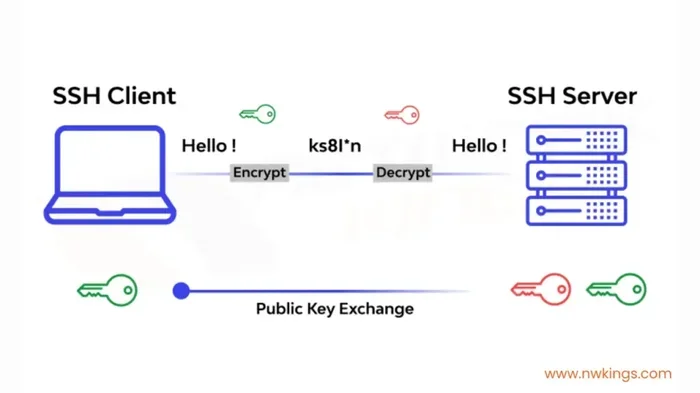
The ssh meaning becomes much clearer once you see how the process works. SSH uses a client-server model. Your computer runs an SSH client, and the remote machine runs an SSH server. When you connect, the two machines perform a handshake, agree on encryption methods, and then securely exchange data.
The Handshake Process
Here is a simplified look at what happens when you type ssh user@server in your terminal:
- The client reaches out: Your SSH client contacts the server on port 22 (the default SSH port).
- The server proves its identity: The server sends its public key to your client. This key is like a digital ID card.
- Your client verifies the server: Your SSH client checks the server’s key against a list of known hosts. If it matches, you are not dealing with an imposter.
- A shared secret is created: Both machines use a clever mathematical process called a Diffie-Hellman key exchange to create a shared secret. This secret is never sent over the network.
- The encrypted tunnel is established: All further communication is encrypted using this shared secret. Even if someone captures the traffic, they cannot read it.
This entire process happens in seconds. The ssh meaning is all about making this handshake secure and automatic so you can focus on your work.
Encryption and Authentication in Action
SSH relies on two main pillars: encryption and authentication. Encryption keeps your data private. Authentication proves you are who you say you are.
Encryption: SSH uses symmetric encryption for the data tunnel and asymmetric encryption (public-key cryptography) for the initial key exchange. Common algorithms include AES, ChaCha20, and RSA. These are the same types of encryption used by banks and government agencies.
Authentication: There are two main ways to log in with SSH. The first is password authentication, where you type your password. The second is public-key authentication, which is much more secure and convenient. With public-key authentication, you generate a key pair. The public key goes on the server, and the private key stays safely on your computer. When you connect, the server challenges your client to prove it has the private key. Your client responds with a cryptographic signature, and the server grants access. No password ever travels over the network. This is the heart of the ssh meaning: secure identity verification without exposing secrets.
Quick Tip: Always protect your private key with a passphrase. If someone steals your private key file, they still cannot use it without the passphrase.
Why SSH Matters for Security
The ssh meaning is deeply tied to security. Before SSH, system administrators used tools like Telnet and rlogin to manage remote machines. These tools sent everything in plain text, including passwords. Anyone who could listen to the network traffic could steal your credentials. SSH was built to eliminate this risk.
The Dangers of Unencrypted Connections
When you use an unencrypted protocol, your data travels through the internet like a postcard. Anyone along the way can read it. This includes:
- Passwords: Hackers can intercept your login credentials.
- Commands: They can see exactly what you type, including sensitive instructions.
- Session cookies and tokens: They can hijack your authenticated sessions.
- Private data: Any files you transfer or commands you run may be exposed.
This is why the ssh meaning matters so much. SSH wraps all of this data in strong encryption. Even if someone captures the network packets, they only see gibberish.
How SSH Protects Your Data
SSH protects your data in several ways:
- Confidentiality: Encryption ensures only the intended recipient can read the data.
- Integrity: SSH uses message authentication codes (MACs) to detect any tampering. If a single bit is changed in transit, the connection is terminated.
- Authentication: Public-key cryptography verifies the identity of both the client and the server, preventing man-in-the-middle attacks.
- Non-repudiation: Digital signatures ensure that actions cannot be falsely denied.
For network security professionals, the ssh meaning represents a cornerstone of zero-trust architectures. It is not just a tool; it is a fundamental layer of defense.
Common Mistake: Never ignore host key warnings. If your SSH client warns you that a server’s key has changed, it could be a sign of a man-in-the-middle attack. Always investigate before proceeding.
Common SSH Use Cases You Will Love
The practical ssh meaning shines when you see how people use it every day. SSH is not just for geeks in dark rooms. It is a versatile tool that powers much of the modern internet.
Managing Servers Remotely
This is the most common use of SSH. As a system administrator, you can log into a remote Linux server and manage it exactly as if you were sitting at its keyboard. You can install software, check logs, restart services, and edit configuration files. With SSH, you do not need a physical monitor or keyboard for the server.
Developers use SSH to push code, manage repositories, and run deployment scripts. The ssh meaning in this context is “remote control with full security.”
Secure File Transfers with SFTP and SCP
SSH also provides secure file transfer capabilities. Two popular protocols built on SSH are SFTP (SSH File Transfer Protocol) and SCP (Secure Copy Protocol).
- SFTP: Works like a regular FTP but over an encrypted SSH connection. You can browse directories, upload, and download files safely. Many FTP clients like FileZilla support SFTP.
- SCP: A simple command-line tool for copying files between hosts. For example,
scp myfile.txt user@server:/home/user/securely sends a file to the remote server.
The ssh meaning extends to these file transfer methods because they rely on the same encrypted tunnel. No one can sniff your files while they are in transit.
Port Forwarding and Tunneling
SSH tunneling, also called port forwarding, is a powerful feature. It lets you create an encrypted tunnel through a firewall to access services that might otherwise be blocked. For example, if you are on a public Wi-Fi network, you can use SSH to securely access a database running on a remote server. The traffic travels through the encrypted SSH tunnel, bypassing the firewall safely.
There are three types of port forwarding:
- Local forwarding: Forwards a port on your local machine to a port on the remote server.
- Remote forwarding: Forwards a port on the remote server to a port on your local machine.
- Dynamic forwarding: Creates a SOCKS proxy that can route any traffic through the SSH connection.
This is one of the most practical aspects of the ssh meaning. It turns SSH into a secure VPN-like tool for bypassing network restrictions.
Quick Tips for Everyday SSH Users
- Use SSH config files: Create a
~/.ssh/configfile to save hostnames, usernames, and keys. You can then connect with justssh myserverinstead of typing the full command. - Use SSH agent: Load your private key into the SSH agent so you do not have to type your passphrase every time.
- Set up key-based authentication: Disable password authentication on your server and use SSH keys only. This dramatically reduces the risk of brute-force attacks.
- Keep your software updated: Always run the latest version of your SSH client and server to patch security vulnerabilities.
Common Mistakes to Avoid
- Using default passwords: If you must use password authentication, use a long, random password. Never use “password123.”
- Ignoring key passphrases: An unprotected private key is as good as a stolen password.
- Running SSH as root: Disable direct root login. Use a regular user account and escalate privileges with
sudowhen needed. - Forgetting to back up keys: If you lose your private key, you may lose access to your servers. Store backups securely.
Expert Insights
Senior DevOps engineers often say that SSH is the glue of modern infrastructure. “The ssh meaning is not just about encryption; it is about trust and automation,” says one expert. “We use SSH keys to let our CI/CD pipelines deploy code safely. Without SSH, modern cloud computing would be a lot harder.”
Setting Up SSH: A Beginner’s Guide
The ssh meaning becomes real when you set it up yourself. Setting up SSH is easier than you might think. Here is a step-by-step guide for beginners.
Installing SSH on Different Operating Systems
Linux: Most Linux distributions come with OpenSSH pre-installed. If it is not installed, you can usually install it with your package manager. For example, on Ubuntu you would run sudo apt install openssh-server to set up an SSH server.
macOS: macOS includes SSH by default. You can enable the SSH server in System Settings under General > Sharing, or simply use the Terminal to connect to remote servers. The ssh meaning on macOS works exactly the same as on Linux.
Windows: Windows 10 and 11 now include a built-in OpenSSH client and server. You can enable it in Settings > Apps > Optional Features. You can also use Windows PowerShell to run SSH commands. For older Windows versions, tools like PuTTY provide a graphical SSH client.
Generating SSH Keys
SSH keys are the foundation of secure, passwordless authentication. Here is how to generate them:
- Open your terminal or command prompt.
- Type
ssh-keygen -t ed25519and press Enter. This creates a strong Ed25519 key pair. - Choose a location to save the key (the default is usually fine).
- Enter a passphrase when prompted. This adds an extra layer of protection.
After this, you will have two files: a private key (id_ed25519) and a public key (id_ed25519.pub). The ssh meaning in this context is “the key pair that proves your identity without revealing your secret.”
Connecting to a Remote Server
To connect to a remote server, copy your public key to the server using ssh-copy-id user@server. Then you can connect with ssh user@server. If you set up your keys correctly, you will be logged in without typing a password.
If you need to connect for the first time, your SSH client will ask you to verify the server’s fingerprint. This is a security feature. Compare the fingerprint with the server administrator to ensure you are connecting to the right machine. This step is a core part of the ssh meaning: verifying trust before opening the encrypted tunnel.
Quick Tips for New Users
- Use aliases: Create short names for your servers in the SSH config file.
- Use SSH agent forwarding: This lets you use your local SSH keys when connecting to a jump server or another remote host.
- Keep your terminal clean: Use tools like tmux or screen inside an SSH session to keep your work alive even if the connection drops.
Common Mistakes Beginners Make
- Sharing private keys: Never send your private key to anyone or upload it to a public repository.
- Using weak key types: Avoid older algorithms like DSA or RSA-1024. Use Ed25519 or RSA-4096.
- Leaving SSH servers open to the world: Use a firewall to restrict SSH access to trusted IP addresses only.
SSH vs. Telnet and Other Remote Access Tools
To fully appreciate the ssh meaning, it helps to compare SSH with older remote access tools. The most common comparison is SSH versus Telnet.
A Comparison Table
| Feature | SSH | Telnet |
|---|---|---|
| Encryption | Yes, strong encryption for all data | No, all data sent in plain text |
| Security | High, protects against eavesdropping | Very low, anyone can intercept traffic |
| Default Port | 22 | 23 |
| Authentication | Password and public-key authentication | Password only |
| File Transfer | Built-in SFTP and SCP | No secure file transfer |
| Tunneling | Yes, supports port forwarding | No |
| Modern Use | Standard for secure remote access | Deprecated for production use |
Why SSH Won Over Telnet
Telnet was the standard for remote access in the early internet era. But its lack of encryption made it obsolete for any serious use. The ssh meaning as a secure replacement was clear from the start. Today, Telnet is only used in legacy systems or for testing network services on local machines. No one should use Telnet over the public internet.
Other tools like rlogin and rsh also suffer from the same security flaws. SSH’s encryption, strong authentication, and additional features like tunneling made it the undisputed winner. The ssh meaning is not just a protocol; it is a complete secure communication framework.
Key Takeaways for Your SSH Journey
Let us recap the most important points about the ssh meaning and how you can apply them.
- SSH stands for Secure Shell: It is an encrypted protocol for safe remote access and data transfer.
- The ssh meaning revolves around three core ideas: confidentiality, integrity, and authentication.
- SSH uses public-key cryptography: This is the most secure and convenient way to authenticate without sending passwords.
- It works on all major platforms: Linux, macOS, Windows, and even mobile devices support SSH.
- Common uses include server management, secure file transfers (SFTP/SCP), and port forwarding/tunneling.
- Setting up SSH is straightforward: Generate keys, copy the public key to the server, and connect.
- Always follow security best practices: Use strong keys, protect private keys with passphrases, and disable password authentication when possible.
Conclusion
The ssh meaning is more than just an acronym. It represents a secure, encrypted, and trusted way to connect to remote computers and manage them safely. From its origins as a replacement for insecure plaintext protocols to its current role as the backbone of modern DevOps and IT operations, SSH has proven its value time and again.
When you understand the ssh meaning, you understand how the internet keeps its most sensitive data safe. Whether you are deploying a website, managing a cloud server, or simply transferring files, SSH gives you the confidence that your connection is private and secure.
Now that you have a solid grasp of the ssh meaning, it is time to put that knowledge into practice. Set up SSH keys on your local machine, connect to a remote server, and explore the features like SFTP and port forwarding. The world of secure remote access is open to you, and SSH is the key that unlocks it.
Frequently Asked Questions
What is the default SSH port?
The default SSH port is 22. This is the standard port that SSH servers listen on for incoming connections. You can change this port for added security, but port 22 is the most common setting.
Is SSH secure?
Yes, SSH is highly secure when configured correctly. It uses strong encryption algorithms to protect data in transit. The ssh meaning itself is built around security, making it far safer than older protocols like Telnet.
How do I generate SSH keys?
You can generate SSH keys using the ssh-keygen command in your terminal. This creates a public key and a private key pair. The public key goes on the server, and the private key stays on your computer for authentication.
Can I use SSH on Windows?
Absolutely. Modern Windows 10 and 11 include OpenSSH client and server. You can also use tools like PuTTY or Windows PowerShell with SSH commands. The ssh meaning works the same across all operating systems.
What is SSH tunneling?
SSH tunneling, also called port forwarding, creates an encrypted tunnel between your local machine and a remote server. It allows you to securely access services that might otherwise be blocked by a firewall. This is a powerful feature that extends the ssh meaning beyond simple remote login.
How does SSH authentication work?
SSH uses either password-based authentication or public-key authentication. Public-key authentication is more secure and convenient. It relies on a pair of cryptographic keys: a public key stored on the server and a private key kept safe on your device. This is the core of what ssh meaning represents in terms of secure identity verification.